

How .NET Runs Your Code, part 1 of 11. Next, When Does a C# Method Become Machine Code?
Tonight Intake’s operators owe a partner an XML file containing a job name. Dana, the release owner on this fictional team, can choose yesterday’s command-line tool or the native executable Ravi just built from the same C#. Both publish commands returned zero. Both flagged the same serializer calls. If you had one job name and one check before the file went out, what would you check?
Dana runs each tool with rebuild-index, then asks what the partner’s XML reader can recover. Yesterday’s tool gives the reader its name back. The native tool stops before writing its first byte. Ravi now has two questions for the release memo. Who supplied the code in each artifact, and which operation demonstrated that the recipient could use it?
- A .NET publish chooses where the runtime comes from, how files travel, and when application methods can acquire machine code. Those are separate decisions.
- Enabling ReadyToRun adds precompiled method bodies to the Intake API assembly. Its launcher still has exactly the same bytes as the ordinary launcher.
- Give the published file a real job and inspect what its consumer receives. The same XML warnings accompany two different outcomes.
- Assign each deployable its own release decision. A healthy HTTP service cannot sign off an operator’s command-line tool.
Look at -r osx-arm64 in both commands. That runtime identifier (RID) names the receiver’s operating system, macOS, and its processor architecture, 64-bit Arm. A Linux virtual machine on the same Mac can execute Arm64 instructions too, but Linux loads ELF executables and macOS loads Mach-O executables. Ravi targets the guest with a Linux toolchain and linux-arm64.
For Dana’s first comparison, keep the macOS receiver fixed. Both commands include the runtime. The second asks for ahead-of-time (AOT) compilation, which turns application code into native instructions during publish.
dotnet publish src/Intake.Cli -c Release -r osx-arm64 --self-contained true \
  -o out/jit
dotnet publish src/Intake.Cli -c Release -r osx-arm64 --self-contained true \
  -p:PublishAot=true -o out/native
The native publish reports IL2026 and IL3050 at the serializer constructor. Watch where the publisher puts the executable despite those warnings.
Dana captures each tool’s standard output as the partner document and reads standard error separately. Combining the streams would turn an exception message into a nonempty file that no partner could parse.
Four deployables share a job and need four release decisions
Ravi wants to reuse one publish profile across Intake. Lena, who maintains the job rules and the partner exporter, asks Dana which executable actually writes the document. Look at where the same job goes after an operator submits it.
An operator can submit a named job through the intake command-line interface (CLI). The HTTP application programming interface (API) checks the payload limit, puts the job in a journal and acknowledges it. A worker takes a pending job, applies a rule and writes the partner document. The fourth program, a web console built with model-view-controller (MVC) and Razor views, shows operators the journal and failed exports.
A successful submit has narrower meaning than a finished export. The API can correctly acknowledge rebuild-index while the worker subsequently fails to produce the document. Dana can reproduce the same failure immediately with the tool’s export command. Follow the call from that deployable into the shared exporter in the solution tree. What an accepted request promises.
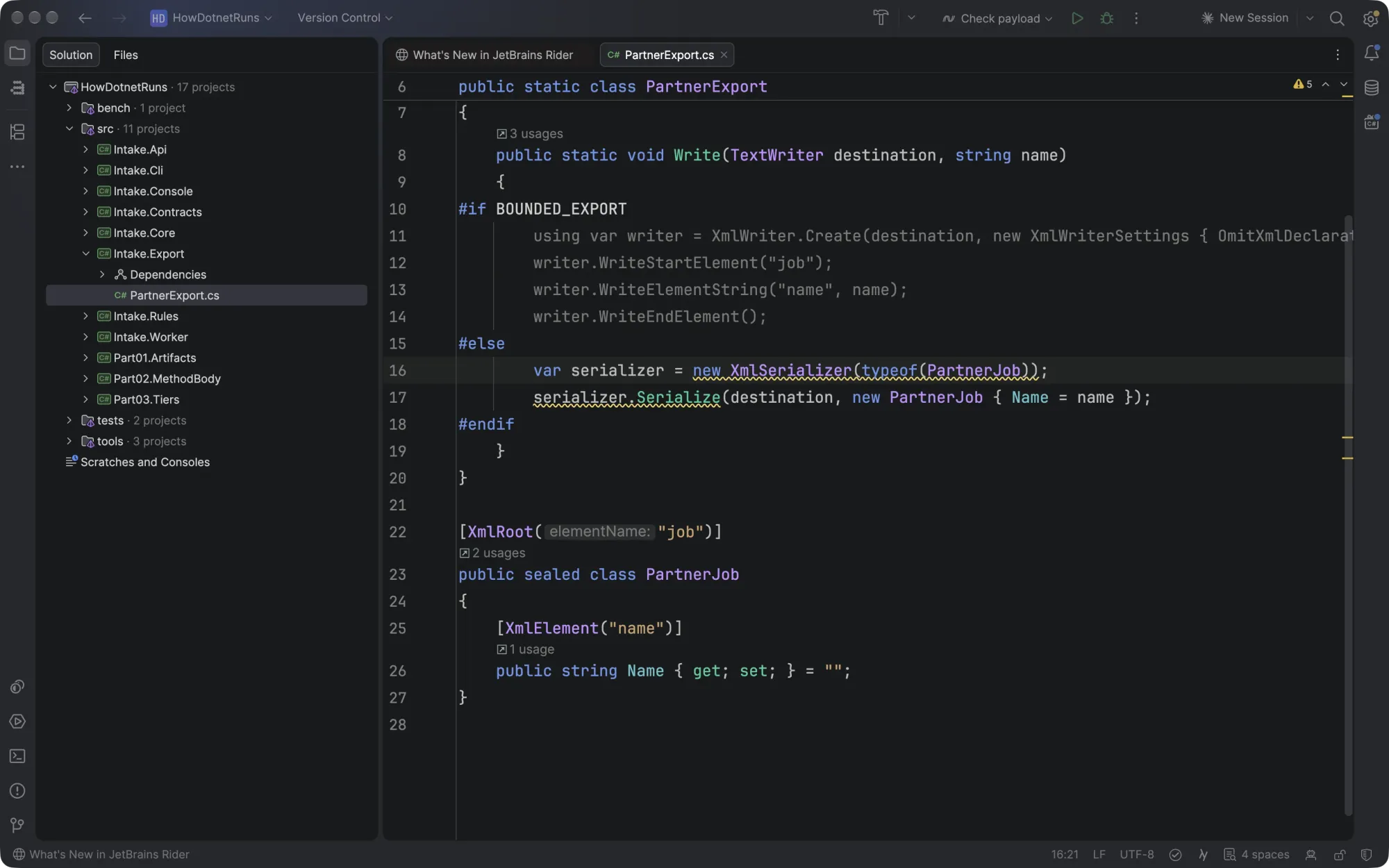
Dana adds one row to her release memo for each executable. The unit of a row is the thing someone actually deploys. If an API and a worker share a library, a change in that library belongs in both test runs. If they ship on separate schedules, a bad worker export need not roll back the API. What could make one build of the same library behave differently from another?
Three choices hide behind a publish profile
Start with what the receiver already has. A framework-dependent app looks for a compatible installed .NET runtime, and this web app also needs the ASP.NET Core shared framework. A self-contained app brings its runtime. Either can still carry managed assemblies. An assembly is a file containing compiled program definitions and, in an ordinary build, the intermediate language instructions that describe their methods. Engineers usually shorten intermediate language to IL.
Next choose how to distribute the files. A single-file publish bundles components so an operator can carry fewer files. Bundling can be framework-dependent or self-contained. A bundler can put the very same IL inside one larger executable. Seeing one large executable tells Dana little about the instructions for her payload check. Microsoft’s single-file deployment guide.
Finally choose when to compile application methods for the target processor. A just-in-time compiler, the JIT, can do that work while the process runs. ReadyToRun adds precompiled bodies alongside IL and leaves the JIT available. Native AOT compiles reachable code into a native image during publish. These names describe different combinations of choices. For the actual commands in this solution, what differs between the folders Dana could ship?
Five outputs answer four different questions
- Read across a candidate to see what a receiver needs before it can execute the application.
- The managed builds carry intermediate language in assemblies or inside the bundle. A native executable carries compiled application code.
- ReadyToRun adds precompiled method bodies alongside managed code. The native build compiles the code selected for the executable.
- The first four candidates can ask the JIT to produce a method body while the process runs.
- The platform team can service the shared runtime centrally. The owners of the self-contained candidates redistribute an updated package.
Flags and folder manifests in results/mac/part01, one Release publish per configuration. The single-file and ReadyToRun examples here are self-contained.
Follow the single-file row and the Native AOT row across to the JIT column. Both can give an operator an executable that looks self-sufficient. One can generate new machine code after launch. The other already has the native bodies it will execute. Our ReadyToRun example also brings its runtime because the publish command requested that configuration. ReadyToRun compilation.
A publish folder includes much more than the entry point
On the Mac, both ordinary intake-api and Native AOT intake-api are Arm64 executables. Imagine trying to estimate the application’s size from a file picker that shows only those two rows. For the ordinary build, most of what the receiver needs is beside the launcher. For the native build, the linker has put application code and parts of the runtime into the executable. Which files would you count?
The table counts every regular file in each fresh Release output, recursively, including symbols. Bytes are uncompressed file lengths. The same API source and .NET 11 runtime line were used on the Apple Silicon Mac. The composite variant compiles a set of assemblies together for ReadyToRun. Look first at the file count for the two ostensibly single-executable choices.
| Release API, Mac Arm64 | Regular files | Bytes |
|---|---|---|
| Framework-dependent | 10 | 213,312 |
| Self-contained JIT | 337 | 119,758,069 |
| Self-contained single-file | 5 | 114,250,492 |
| ReadyToRun | 337 | 119,852,277 |
| Composite ReadyToRun | 338 | 152,100,133 |
| Native AOT | 7 | 49,283,229 |
Keep the .NET 11 API and the physical machine, an Apple M3 Max. Build once for macOS and once inside the Linux Arm64 virtual machine on that Mac. Ravi wants to archive the entire output so he can turn an address in a crash report back into a method name. Dana can keep the native debug symbols in that archive and send the other files to the receiver. Which target needs more space in each place? Read across each row in uncompressed bytes.
| Native AOT target | Executable | Native symbols | All files | If native symbols stay in the archive |
|---|---|---|---|---|
| macOS Arm64 | 9,873,288 | 39,357,100 (.dSYM bundle) | 49,283,229 | 9,926,129 |
| Linux Arm64 VM | 10,481,336 | 20,712,288 (.dbg file) | 31,243,137 | 10,530,849 |
The Linux executable is 608,048 bytes larger, yet its complete folder is 18,040,092 bytes smaller. The larger macOS symbol bundle explains the reversal. If the deployment copies everything, budget the “All files” column. If the pipeline archives the native symbols separately, the last column gives the remaining file bytes, including the managed symbol files. To compare the CPU cost of running the service, measure CPU time per correctly processed job on each receiver.
The primary API DLL is just 14,336 bytes in the ordinary folder. It contains the handlers, uses Intake.Core for the payload check and reads JSON descriptions from Intake.Contracts. Its native counterpart is a linked program that includes the runtime code it needs. Comparing those two file lengths would charge each side for a different set of responsibilities.
To locate the bulk of the ordinary candidate, run Part01.Artifacts anatomy on its folder. The first five entries by length, shown below without their hashes, explain why shrinking a handler would have little effect on the folder total.
    18997032  System.Private.CoreLib.dll
     8696144  System.Private.Xml.dll
     5451056  libcoreclr.dylib
     4821288  System.Linq.Expressions.dll
     3177768  System.Data.Common.dll
The runtime, core library and framework assemblies dominate this particular directory. File presence establishes what the deployment can load. It does not show which code the first request touches or how much memory a running process will occupy. Those are observations of a living process.
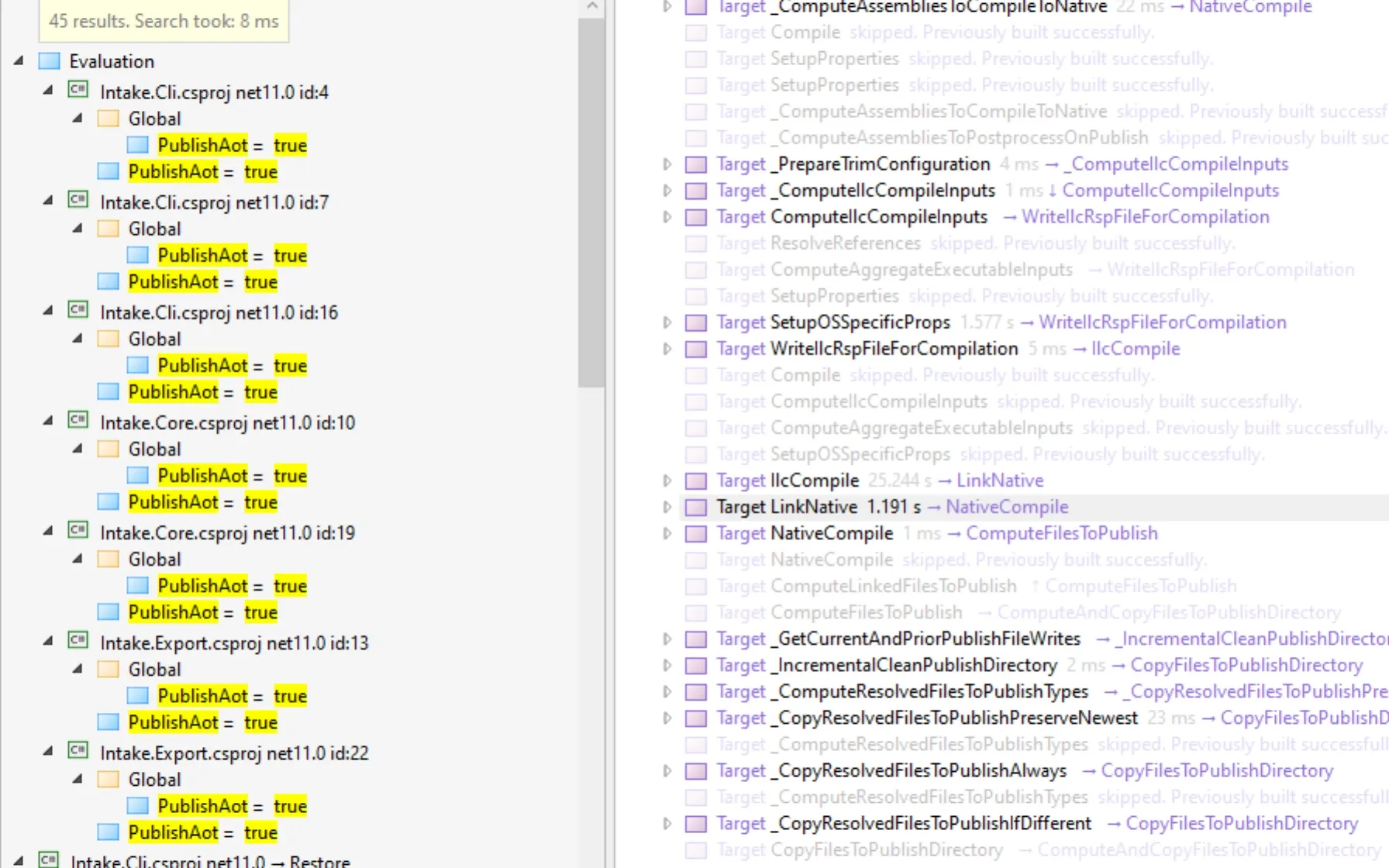
A publish has an equally useful view from the build side. Add -bl:native.binlog to the native command and open the resulting MSBuild binary log. Inspect the evaluated PublishAot property, then look for the executed targets IlcCompile and LinkNative. The compiler generates code for the target. The linker assembles that output and the required native components into the runnable image. The two target entries answer which work ran. No quiet build machine was designated, so Dana leaves the publish-time comparison open.
Matching launcher hashes can identify two different releases
A native operating-system file starts each ordinary API. The term apphost means this application-specific launcher. Suppose Ravi fingerprints only that file as it enters the deployment store. Would turning on ReadyToRun for the API require a new fingerprint?
Read one column down before comparing it with the next. These are the first 16 hexadecimal characters of the SHA-256 fingerprints from the .NET 11 Mac runs. A folder fingerprint here hashes its sorted relative file names together with the digest of each file’s contents.
| API publish | Launcher | Application DLL | Complete folder |
|---|---|---|---|
| Self-contained JIT | e265220e47e3b39f | 0a455962f22801cb | e9c966f15898aa15 |
| ReadyToRun | e265220e47e3b39f | ac9f5018e9109e1a | 47e2d721c8b99561 |
The two launchers have identical full digests. One application assembly is 14,336 bytes and the ReadyToRun version is 28,672. A deployment store keyed only by the launcher could put the wrong application DLL beside a perfectly familiar entry point. Compare the two hashes within your own build pair. Rebuilding in another directory can also change symbol files and the complete folder digest. Keep the release archive or a manifest naming every deployed file. This file-level hash describes contents and names. A packaging system that also controls permissions must preserve those separately.
The ordinary host uses configuration and dependency information before your handler runs. In the self-contained runtime configuration below, look for includedFrameworks and the two version entries. A framework-dependent web API instead declares the frameworks it wants the installed host to resolve.
{
  "runtimeOptions": {
    "tfm": "net11.0",
    "includedFrameworks": [
      {
        "name": "Microsoft.NETCore.App",
        "version": "11.0.0"
      },
      {
        "name": "Microsoft.AspNetCore.App",
        "version": "11.0.0"
      }
    ],
    "configProperties": {
      "System.GC.Server": true,
      "System.Reflection.Metadata.MetadataUpdater.IsSupported": false,
      "System.Runtime.Serialization.EnableUnsafeBinaryFormatterSerialization": false
    }
  }
}
The list identifies the included runtime and ASP.NET Core framework. The dependency file identifies the assets associated with that target. Here are the first 20 lines of the API’s 50,028-byte deps.json. Read from the target name to the references to the two shared Intake libraries.
{
  "runtimeTarget": {
    "name": ".NETCoreApp,Version=v11.0/osx-arm64",
    "signature": ""
  },
  "compilationOptions": {},
  "targets": {
    ".NETCoreApp,Version=v11.0": {},
    ".NETCoreApp,Version=v11.0/osx-arm64": {
      "intake-api/1.0.0": {
        "dependencies": {
          "Intake.Contracts": "1.0.0",
          "Intake.Core": "1.0.0",
          "runtimepack.Microsoft.NETCore.App.Runtime.osx-arm64": "11.0.0",
          "runtimepack.Microsoft.AspNetCore.App.Runtime.osx-arm64": "11.0.0"
        },
        "runtime": {
          "intake-api.dll": {}
        }
      },
The host can use these descriptions when it builds the search paths for managed assemblies and native libraries. A missing framework can stop an ordinary process before the first line of application code. A native executable still needs the operating system’s binary interface and the native libraries it was linked against. Both cases give Ravi specific receiver checks to perform. How the .NET host builds probing paths.
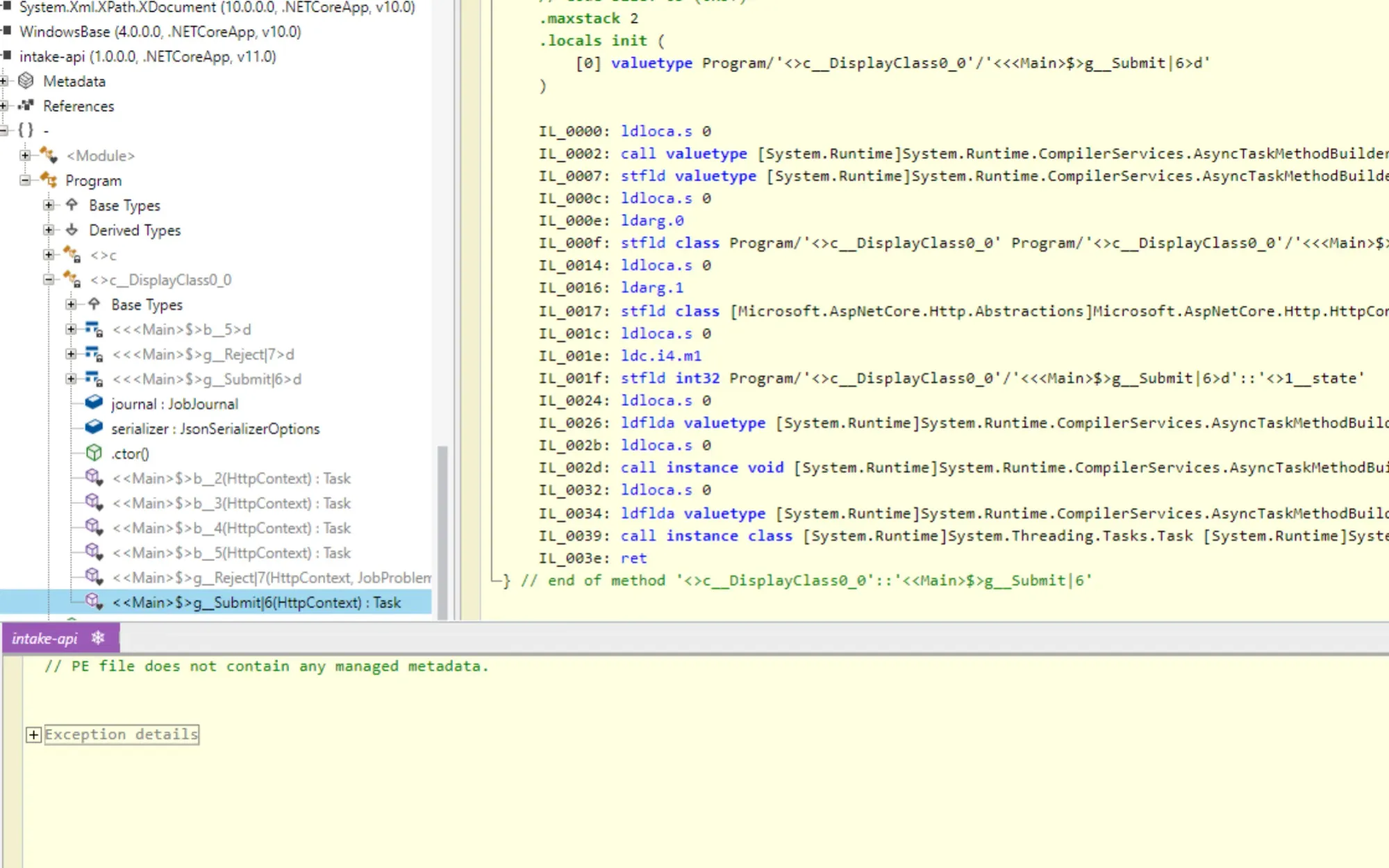
Open the managed API DLL in an IL viewer and find the submit handler. Immediately before the call to PayloadPolicy.Fits, the IL loads the request’s byte count and the inclusive limit, 1024. Opening the native Mac executable in the same tool produced BadImageFormatException. That result says something precise about this file and this viewer. To inspect the native instructions, use a debugger or disassembler that understands the target’s executable format.
Two startup flags explain which capabilities the process sees
Dana can now tell the files apart at rest. Lena still wants to know what the application sees when it wakes up. The first property below asks whether the running process supports dynamic code generation. The second reads the default reflection setting for System.Text.Json, the JSON library. Keeping the two questions separate is important when a service writes responses for more than one type.
internal static class Banner
{
    public static string Describe() =>
        $"Runtime {RuntimeInformation.FrameworkDescription}; " +
        $"dynamic code {RuntimeFeature.IsDynamicCodeSupported}; " +
        $"JSON reflection {JsonSerializer.IsReflectionEnabledByDefault}";
}
The solution includes this standalone banner probe. The API prints the same properties at startup. In each case below a fresh published API answered GET /health with HTTP 200. The two server logs show which process answered.
Runtime .NET 11.0.0; dynamic code True; JSON reflection True
Runtime .NET 11.0.0; dynamic code False; JSON reflection False
The first process is the ordinary self-contained API. The second is its native counterpart. The booleans describe capabilities or library defaults. They do not establish whether the API can serialize its particular error object, or whether an entirely different XML library can write Lena’s partner document. For that, give each feature a real input.
One parsed name changes the release decision
Lena’s exporter constructs an XmlSerializer for the partner’s job type and asks it to write to standard output. Which build fails if both logs identify the constructor as a risk? In the native log, the analyzer reports the following two diagnostics at the same source location. Only the location and code from two of the 23 output lines are shown here.
PartnerExport.cs(16,26): warning IL2026
PartnerExport.cs(16,26): warning IL3050
IL2026 marks a call whose requirements the trimmer cannot fully analyze as it removes unused code. IL3050 marks a call that may require generating code while the app runs. Compatibility analysis is enabled on the shared export project in both builds. The messages explain why this call needs attention. Neither gives Dana the parsed name from the document she plans to send.
Sign off on the publish and the health check
The tool publishes. The service responds with ready. Neither action passes a job to the partner exporter. What could the operator put in tonight’s delivery?
Sign off on what the partner can read
Launch the exact executable in the candidate folder. Give it a name, capture its two output streams and verify the parsed document. Use the same expectations for each candidate.
Walk through the test below as the release pipeline. Start with R&D <night>. An XML writer must escape some of those characters in the byte stream. A partner who parses the document should get the original name back. For the empty string, the document should still contain a name element. Where can the test reject a bad release?
One parsed name can stop a finished publish from shipping
[Theory]
[InlineData("rebuild-index")]
[InlineData("R&D <night>")]
[InlineData("")]
public async Task ThePartnerCanReadBackTheName(string name)
{
    var command = PublishedApps.Command(await apps.Executable("Cli"), "export", name);
    var result = await PublishedApps.RunBytes(command);
    Assert.True(result.ExitCode == 0, $"Exit {result.ExitCode}: {result.StdErr}");
    using var document = new MemoryStream(result.StdOut);
    var job = XDocument.Load(document).Root!;
    Assert.Equal("job", job.Name);
    var element = Assert.Single(job.Elements());
    Assert.Equal("name", element.Name);
    Assert.Equal(name, element.Value);
}- The partner supplies three different names. An empty value and markup characters expose mistakes hidden by ordinary text.
- The adapter starts the executable from the selected publish directory and passes the name as a single argument.
- The process result gives the release owner the earliest useful failure. A successful exit permits a second check.
- Read the document as the partner would. Require its element names, shape and decoded value before releasing this build.
Excerpt from tests/Acceptance.Tests/ExportAcceptance.cs. The Mac acceptance reports in results/mac/part01 include the failed native export. The process-launch helper is omitted.
A Windows run exposed a mistake in this test’s first version. The managed tool exited zero and the test passed after decoding its output into a .NET string. The partner starts with bytes. On the Windows console configured for code page 437, the original exporter wrote encoding="Codepage - 437" in the XML declaration. Given those exact 191 bytes, the .NET XML reader recovered rebuild-index from a predecoded string, then threw XmlException when asked to open the byte stream. A string reader skipped the very decision the partner’s parser had to make.
The CLI now constructs its export writer with explicit UTF-8 encoding. The acceptance test passes its raw stdout to XDocument.Load. The same Windows receiver then recovered the name from the managed export. An XML declaration, the actual bytes and the receiving parser have to agree. A successful process exit tells you none of those things.
The fixed native control uses an explicit XML writer for this known document shape. Its tests recover the ordinary name, the characters requiring escaping and the empty value. In the original native candidate all three export cases fail before the parser gets a document. The separate worker delivery test also fails. On this worker, a handled export failure can leave the process with a successful exit while the expected file is absent. Requiring a partner-readable file catches both paths.
The ordinary candidate passes the published-application tests. The native API handles the tested HTTP operations, including a structured bad request. Dana can hold the original native tool and worker without declaring a problem in every native program. Part 6 will change one input to the compiler at a time to identify what the serializer needed. What can Ravi decide today about the artifact the platform team will maintain?
The team that supplies the runtime owns the patch
Suppose the platform team publishes a patched ASP.NET Core base image. The framework-dependent API can run against that image’s compatible shared runtime. Its operators still need to rebuild or rebase and redeploy the container image so the process actually starts on the patched layers. For a self-contained API the runtime files came from the application’s own publish. Replacing only the base image can leave those files exactly as they were. Republish the application with the appropriate patched runtime and qualify the resulting image.
Now predict an image size. On Linux Arm64 the framework-dependent .NET 11 API publish contains 167,724 bytes. The self-contained JIT publish contains 120,758,689. Would adding those folders to the right Microsoft base images leave the framework-dependent result roughly 120 million bytes smaller?
| Linux Arm64 API | Base image family | Local image bytes |
|---|---|---|
| Framework-dependent | ASP.NET Core | 252,416,677 |
| Self-contained JIT | Runtime dependencies | 252,275,673 |
| Native AOT | Runtime dependencies | 162,760,121 |
The smaller publish directory yields the slightly larger finished image. The framework-dependent folder sits on a base that already supplies ASP.NET Core and the .NET runtime. The self-contained folder brings those files to a smaller base. Each image total counts everything underneath its application.
What changes when the worker joins the API?
Ravi’s node already has the API image. He wants to add the worker from the same publish profile. A filesystem layer records changes such as added, replaced or removed files. Docker combines the layers in order from the base upwards. Compare the two recorded lists in that order. A DiffID identifies the uncompressed contents of one filesystem layer. Matching IDs in the same order reveal the filesystem history the two images have in common. Which layer is new to a node that holds the API image and has no other cached layers? OCI image configuration and DiffIDs.
Putting the runtime in each publish changes what the worker must add
- The framework-dependent API and worker start from six identical lower layers. Read their final layer IDs to find where the files diverge.
- The worker adds its own application layer. The common base already holds the runtime that both programs require.
- Now suppose the node holds the self-contained API instead. Its three lower layers match the self-contained worker, and its application layer includes runtime files.
- The two top layers both round to 121 MB, but their contents have different IDs. Equal displayed size does not let Docker reuse the API layer as the worker layer.
Linux Arm64. Ordered layer digests and history sizes come from the API and worker image reports in results/mac/part01. The eight-character prefixes identify matching layers. Registry traffic was unmeasured.
The 201 kB and 121 MB labels are rounded sizes from local Docker history. For a pull estimate, start with the registry manifest’s blob digests and encoded sizes, then check which blobs the destination already has. A registry may serve compressed content. Adding the two local image totals would count their common layers twice, while timing a pull adds the effects of the network and local unpacking. OCI image manifest layer descriptors.
Try it with a service you own. Pair an API with the scheduled importer that runs beside it. Choose the same receiver architecture for both. From each built image, write down the base reference, how the .NET runtime gets supplied and the first layer where their IDs differ. Now imagine a .NET security fix. For each program, decide whether to replace the base, publish fresh application files, or do both. Finish the memo by naming one importer output an independent consumer must read back after redeployment. That gives the platform engineer a patch owner and the release owner a check that can actually stop a bad shipment.
A release memo needs the target as well as the packaging choice. This compact table shows file count followed by total bytes for the API. Each available cell is one fresh Release publish with all regular files counted recursively, including its platform’s symbol companions. Windows and macOS ship different target formats, runtime assets and symbols, all of which count toward these totals. The .NET 11 Linux x64 run uses an emulated container on the Mac. The .NET 10 Linux x64 run uses a native x64 Linux Docker engine. Both rows describe file contents. The download contains the per-deployable lists, largest files and complete manifests.
| Receiver target | Runtime | Shared | Self-contained JIT | ReadyToRun | Native AOT |
|---|---|---|---|---|---|
| macOS Arm64 | .NET 10 | 10 / 262,748 | 337 / 116,995,291 | 337 / 117,090,011 | 7 / 48,486,349 |
| macOS Arm64 | .NET 11 | 10 / 213,312 | 337 / 119,758,069 | 337 / 119,852,277 | 7 / 49,283,229 |
| Windows x64 | .NET 10 | 11 / 295,208 | 341 / 110,637,080 | 341 / 110,740,504 | 5 / 57,361,073 |
| Windows x64 | .NET 11 | 11 / 210,448 | 340 / 117,089,523 | 340 / 117,195,507 | 5 / 57,457,993 |
| Linux Arm64 | .NET 10 | 10 / 209,348 | 338 / 118,956,675 | 338 / 119,050,883 | 5 / 31,065,397 |
| Linux Arm64 | .NET 11 | 10 / 167,724 | 338 / 120,758,689 | 338 / 120,852,897 | 5 / 31,243,137 |
| Linux x64 | .NET 10 | 10 / 210,052 | 338 / 109,884,319 | 338 / 109,960,095 | 5 / 31,174,301 |
| Linux x64 (emulated) | .NET 11 | 10 / 167,732 | 338 / 111,429,957 | 338 / 111,507,781 | 5 / 31,298,649 |
Use the comparison to choose what to inspect on your own receiver. For an operator’s CLI on a fleet with an installed compatible runtime, inspect the small app and the framework it will resolve. For a self-contained service, inspect and fingerprint the full directory. For a bundled tool, inspect the companion files that still need to travel. For a native executable, keep its matching symbols where an incident investigation can retrieve them. A request that works locally and fails after deployment.
A folder total is sensitive to the counting rule. Counting lines in a long directory listing can include a header. Counting top-level entries treats an entire symbol directory as one item. This comparison adds the lengths of regular files recursively. Reproduce it with the inspector rather than counting what fits on the terminal screen.
Eight questions belong beside each executable
Dana’s memo starts with four rows for the API, worker, tool and operations console. Each row names its runtime line, candidate publish mode, evidence and reversal condition. A reversal condition makes “ship” testable. For example, a supposedly compatible CLI must still export a job whose name contains an ampersand. Which observation would force your own team to pick another candidate?
- What files and runtime must reach the receiver? List the candidate, target, dependencies, symbol handling and the team that rebuilds it for a runtime patch. This part establishes those facts.
- When does one method acquire processor instructions? Open
PayloadPolicy.Fitsbefore and after the first call in part 2. - Can those instructions change as the process runs? Read the version headings in part 3. Part 4 opens a ReadyToRun image to see what a JIT can still replace.
- Which features need runtime code or metadata? Parts 5 and 6 follow the worker’s rule and the exporter’s serializer through the actual published builds.
- Which machine can build it, and where has it run? Part 7 separates the build agent, target identifier and receiver that executed the file.
- What does the first caller wait for? Part 8 follows a fresh CLI process from launch until the partner’s XML reader recovers the job name.
- How much work can one instance sustain? Part 9 asks how many ASP.NET requests still receive a correct response by their deadline as arrivals rise.
- What memory remains, and can we diagnose it? Part 10 asks how much memory the worker needs while it exports a batch of partner documents. Part 11 puts all eight answers beside the shipping decision.
Write the runtime line alongside each row. On the reference release, .NET 10.0.15 is the long-term support line and .NET 11.0.0 the standard-term line. Microsoft lists active support for both. A single support label leaves the XML question open. Run the acceptance checks on the version and target that will ship. Microsoft’s .NET support policy.
The two launchers looked alike and the service passed its health check. Neither told us when the CPU gets instructions for a line of C#. Mark the possible times on one map. When does the compiling happen in each mode?
A native publish finishes the compilation work before launch
- Follow one reachable application method across the file, the new process, its first call and subsequent work.
- The native executable contains target instructions before any user has started it or supplied an input.
- A ReadyToRun method may start in precompiled code. Methods without a usable body can go through the JIT.
- An ordinary JIT deployment carries application IL. The process can start before this particular method needs instructions.
- Two rows still have a JIT after the first call. A second body for one method is the question for part 3.
Execution model from Microsoft’s publishing and ReadyToRun guides. Parts 2 and 3 inspect a named method on the corresponding rows.
On the native exporter row Dana can already write “hold” and point at the missing document. On the API row she has a working endpoint and a choice of build outputs. Deciding whether a different compilation model pays for itself needs a first correct response measured on the intended receiver.
Run the release check on a folder you could deploy
Install the pinned .NET SDKs, Python and the native toolchain for your operating system. Native AOT on Windows needs the C++ desktop workload. On the Mac, install the Xcode command-line tools. From the root of the download, run the two publish commands above using your own runtime identifier. Then ask the inspector three different questions. On Windows use the published intake.exe path.
dotnet run --project src/Part01.Artifacts -- anatomy out/jit
dotnet run --project src/Part01.Artifacts -- banner
dotnet run --project src/Part01.Artifacts -- export out/jit/intake 'R&D <night>'
The first command inventories the folder you supply. The banner describes the inspector process itself. Read the API’s own startup log for the service’s values. The last command starts the selected published CLI. Change that one path to the native candidate and keep the input fixed. Lesson 00 of the companion video course poses the release-night question. The manifests, target comparison and repeatable published-file tests here let you answer it for a receiver of your own.
- Write each deployable, target runtime and publish flags in the release memo.
- Identify the exact files to distribute and fingerprint that set, including dependencies.
- Run the partner operation on the published binary and parse its result with the consumer’s rules.
- Exercise the service’s error response as well as its healthy path. Keep the two startup capability values with its runtime information.
- Assign ownership of the runtime patch and record the next observation that would reverse the decision.
Further reading
- Microsoft’s application publishing overview covers framework-dependent and self-contained delivery.
- Single-file deployment describes bundling, extraction and companion files.
- ReadyToRun compilation describes precompiled managed images and composite builds.
- Native AOT deployment lists target toolchains and runtime limitations.
- Warning IL2026 explains a call whose trimming requirements cannot be guaranteed.
- Warning IL3050 explains a call that may need dynamic code.
Four deployables now have separate rows. The original native exporter is on hold. Dana can reverse that decision when a candidate produces the partner document for all three names. The API has passed its checked HTTP operations. Startup, throughput and memory remain open questions.
One line on the API row is still blank. Its assembly contains the rule that accepts a 1,024-byte payload. When a new instance reports ready, does its processor already have the instructions for that comparison?
How .NET Runs Your Code, part 1 of 11. Next, When Does a C# Method Become Machine Code?