

How .NET Runs Your Code, part 12 of 12. Previous, JIT, ReadyToRun or Native AOT? Four .NET Release Decisions.
Dana ships Intake, a fictional job-processing system. An operator starts its command-line tool to check one payload size or write one export. The process then exits. The worker uses the same rule on job after job. Suppose the runtime spends extra CPU to improve the machine code for the next call. Which process will live long enough to benefit?
Keep the ordinary Release build for a .NET 10 or 11 service or worker while it meets your startup, size and sustained-work budgets. Its just-in-time compiler (JIT) already optimizes frequently executed code. The operator gives Dana a different reason to reconsider. Shipping less to a known machine, or doing less work before the first correct document, can be worth changing the publish settings. If you have a project open, start with the decision for an API, a worker or a CLI.
- Leave tiered compilation and dynamic profile-guided optimization (PGO) on for a long-lived application. Compare CPU per completed job and the warm-up cost before overriding either.
- When compilation delays a first request, try ReadyToRun. It supplies some machine code at publish time and keeps the JIT for later calls.
- When the installation is too large, try trimming. When a short-lived tool also needs precompiled code, try Native AOT. Exercise every way the published program reads and writes partner data.
- When most of the wait is before your code starts, measure that queue. A different launch policy can help with the same executable.
What does an ordinary Release publish actually do?
The C# compiler translates a method into intermediate language (IL) and records information about its types and members. That IL describes the operation, such as calling an interface method. For a conventional server or desktop app, .NET's runtime engine, CoreCLR, needs machine instructions for the processor that will execute the call. It can use a compatible precompiled body, or the JIT can produce one when the method is needed.
Release enables compiler optimizations in a standard SDK project. You can ship that build without choosing any special publish mode. Use these four questions to read a publish profile. Supplying the runtime, preparing machine code, optimizing hot calls and bundling files are separate decisions.
| Question | Ordinary .NET 10 and 11 behavior |
|---|---|
| Who supplies .NET? | The receiver supplies a compatible runtime. A normal publish is framework-dependent. |
| Does the publisher precompile my methods? | Application ReadyToRun and Native AOT are both off. The runtime libraries already carry ReadyToRun code for eligible methods. The process uses available compatible code by default. |
| Does the JIT optimize after startup? | Tiering, quick JIT and dynamic PGO are on. Quick JIT also applies to eligible loops on the x64 and Arm64 CoreCLR builds discussed here. |
| What gets removed or bundled? | Trimming and managed single-file bundling are off. A project, imported build file or publish profile can override these defaults. |
Look at the Release build of Intake's payload rule. The loop asks a rule object whether it accepts the next size. In the emitted IL, find callvirt. Which concrete implementation of the interface does that instruction name?
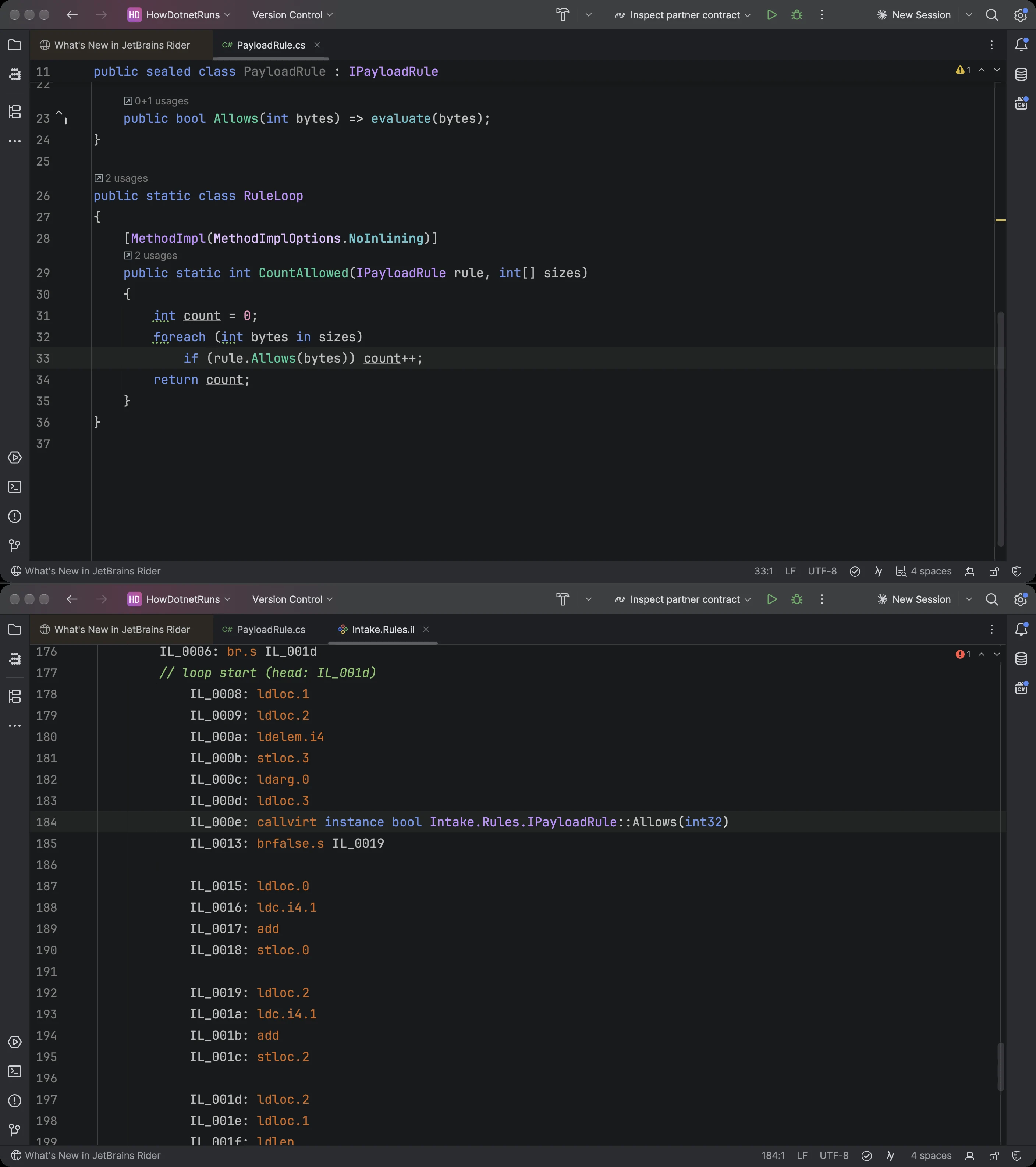
The IL names the interface method. The choice of machine instructions is still open. Suppose the first request calls just one application method. Follow that method through three publishes. Who provides its first body, and who can change that body if a million more requests arrive?
ReadyToRun can supply the first body and still hand a hot method to the JIT
- Look inside the application file before starting it. ReadyToRun keeps the intermediate language (IL) alongside machine code for methods the publisher could prepare for this target.
- Call one method. The ordinary JIT builds its body now. ReadyToRun can use a prepared body or fall back to the JIT. Native AOT enters code from the executable.
- Call it repeatedly. With tiered compilation, both JIT-based modes can install optimized machine code for a hot method. Native AOT ships the instructions it will run.
The rows follow application code. Self-contained IL and ReadyToRun publishes can opt into trimming. Native AOT always trims. ReadyToRun and Native AOT.
That distinction matters even for an application that consists of one source file. Its HTTP listener, collections and serializers also have methods. With ordinary publishing, a startup trace can contain both newly compiled application methods and precompiled framework code. Calling the whole process “JIT” is convenient shorthand for a program that still has a JIT available.
What does PGO buy the worker on its next call?
Early in the process, quickly compiling an eligible method gets the worker to its first job. This first version is called Tier 0. The runtime can count calls and instrument execution to observe which branches or concrete types occur. If a method gets hot, the JIT can spend more CPU on a later optimized version, Tier 1. Code used only at startup may never repay that investment. An eligible long-running loop can switch to an optimized body while the same invocation is on the stack. This is on-stack replacement (OSR).
Intake's CountAllowed receives an IPayloadRule. Our driver supplies a LimitRule that accepts payloads up to and including 1,024 bytes. Of its four sizes, 0, 1,023, 1,024 and 1,025, exactly three pass. The interface parameter leaves room for another implementation of Allows. Step through the method from the worker's point of view. What could the optimizer remove from its usual path while still accepting a different implementation tomorrow?
The JIT can specialize this call and still accept a different rule
[MethodImpl(MethodImplOptions.NoInlining)]
public static int CountAllowed(IPayloadRule rule, int[] sizes)
{
    int count = 0;
    foreach (int bytes in sizes)
        if (rule.Allows(bytes)) count++;
    return count;
}- The caller passes an interface. Keeping this helper out of its caller gives us one method to find in the JIT listing as repeated calls make it hot.
- Each size reaches the same call site. The instrumented code records the concrete type behind
rule. The driver supplied the sameLimitRuleevery time. - The optimized body checks the rule type before the loop. A match lets the loop compare each size directly with the limit. A different type can still reach the interface call.
- With dynamic PGO off, the optimized code calls through the interface and returns the same count. To choose a setting for a busy worker, measure CPU time per correct file.
The method is in src/Intake.Rules/PayloadRule.cs. On the Apple M3 Max, compare ordinary.asm and pgo-off.asm in results/part12/net11.0. The default Tier1 header says Synthesized PGO. For on-stack replacement during a single long call, see the separate Drain example in Part 3.
An advantage of checking the type before the loop is that the processor can compare each of the four sizes directly with the same limit. Without that specialization, the loop must find and call the interface implementation for each size.
Reproduce both call paths with that rule. From the extracted solution directory, run the following commands with Python 3 and the .NET SDK. Each output directory must be new or empty. On Windows, py -3 also works.
python3 bench/finale/observe.py --framework net11.0 --out results-local/net11.0
python3 bench/finale/observe.py --framework net10.0 --out results-local/net10.0
Open ordinary.runtimeconfig.json and pgo-off.runtimeconfig.json side by side. In the ordinary file the PGO key is absent, which leaves the runtime default in force. Publishing with -p:TieredPGO=false writes "System.Runtime.TieredPGO": false into the other file. Look for Tier1 in both machine-code listings and follow the call to Allows. The pauses between batches give the runtime an opportunity to promote the method. They also make this a poor stopwatch for comparing job throughput.
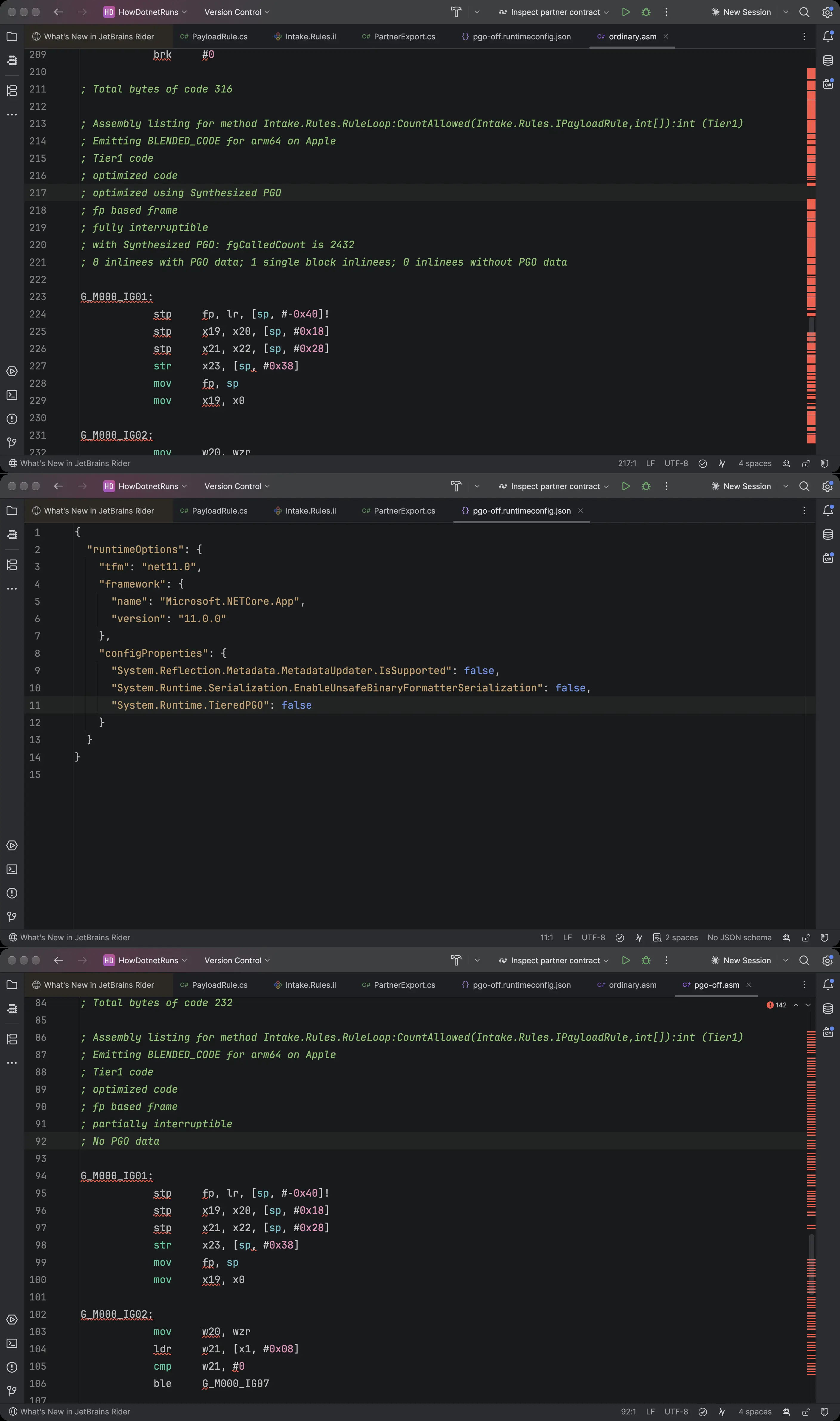
On the M3 Max both builds returned calls=20480 accepted=61440 checksum=871301120 on both runtime lines. On .NET 11 the default Tier 1 body occupied 228 bytes, including its type guard and fallback. With dynamic PGO disabled it occupied 120 bytes and always called through the interface. A shorter body still has to do the work of the call it contains.
In the earlier worker comparison, the rule wrapped a delegate. Both settings returned 192,000 successful size checks across the rule and the direct policy. That count checks the result. To learn which setting saves CPU, you need elapsed CPU time and the number of correctly delivered jobs. The worker's two call paths.
Test a PGO override if replicas recycle so often that they spend much of their lives warming up, or if the rule types after startup differ sharply from those seen early. If you operate the service, you can run the same published files twice. Start one fresh instance with the production defaults, then another with only DOTNET_TieredPGO=0 in its process environment. On both runtime lines, an environment override for this setting takes precedence over the app's generated configuration. Remove it and restart to return to the application's configuration. Runtime configuration precedence.
A misleading CPU comparison
Disable tiering and PGO together, compare two first requests, and commit the result as a worker setting. The first compilation now pays a different cost, and neither process has seen the steady job mix.
A worker comparison you can act on
Change PGO alone. Replay the same arrival rate and rule types on the same receiver. Check the first-job deadline, then divide process CPU by correctly delivered jobs in a later window. Repeat in alternating order and require the gain to exceed run-to-run variation.
Reserve DOTNET_TieredCompilation=0 for a separate question. The JIT then optimizes methods that need compiling on their first compilation. This removes later tier promotion and its opportunity to use dynamic profiles. A fresh process may spend more time compiling. Keep such a change only for a repeatable gain across the process lifetimes you actually deploy. What if the slow operation is the first one and you would still like those later optimizations?
Which setting changes the running process?
For a persistent setting, put the MSBuild property in the executable project’s property group, then publish again. For a diagnostic, set one environment variable on a new instance. These launch settings apply to CoreCLR.
| MSBuild property | One-launch override | Effect of disabling it |
|---|---|---|
TieredPGO | DOTNET_TieredPGO=0 | Keep promotion, remove dynamic profiling. |
TieredCompilation | DOTNET_TieredCompilation=0 | Disable promotion and dynamic PGO. Eligible precompiled code remains usable. |
TieredCompilationQuickJit | DOTNET_TC_QuickJit=0 | JIT-compile eligible IL with full optimizations immediately. Also disables dynamic PGO. Precompiled methods can still be promoted. |
TieredCompilationQuickJitForLoops | DOTNET_TC_QuickJitForLoops=0 | Change the first compilation of methods with loops while leaving tiering available elsewhere. |
The application's generated *.runtimeconfig.json records explicit project settings. An operator's launch override applies to the new process. Compilation configuration options.
Use ReadyToRun when compilation is on the first-response path
ReadyToRun (R2R) asks the publisher to put machine code for eligible methods beside their IL. A new process can use that code immediately. Some methods still need the JIT, for example a generic instantiation that the publisher could not prepare. A hot precompiled method can later acquire a better body using the actual machine and workload. The trade is extra work at publish time and extra bytes to transfer or read before the first response.
Compare two publish folders on the same runtime, processor and deployment model. Our API trial holds self-contained packaging fixed. If your API normally uses an installed runtime, keep both candidates framework-dependent. The API project edit and publish commands below show how to change just application ReadyToRun.
On the Mac Arm64 receiver, enabling individual R2R added exactly 92 KiB to Intake's complete self-contained .NET 11 API folder. Fewer methods needed compilation by the time the server finished the first POST. Now predict the outcome of running that same R2R folder with DOTNET_ReadyToRun=0. Would the count return to the ordinary baseline?
In ten fresh processes with that override, the count ranged from 9,009 to 9,027 compilation starts. The override also makes CoreCLR ignore the framework's precompiled code. It answers a diagnostic question about consuming those images. To decide which folder to ship, use ordinary and R2R siblings with normal runtime settings. Time from just before launch until the client reads the matching job acknowledgement. Compare repeated launches with the cache and host load your deployment will encounter. The first POST and its compilation trace.
Can the partner still read the smaller package?
Trimming asks a different question at publish time. Starting with the program's entry points and any members explicitly marked to keep, the trimmer follows references and removes code and metadata it determines the app can do without. The remaining managed program can still use the JIT. This makes trimming worth trying when a self-contained installation is too large but the application needs runtime compilation.
Consider the JSON exporter in src/Part12.Decision/PartnerExport.cs. Its partner expects a name and an accepted count. The ordinary reflection overload inspects type metadata at run time to discover how to write the report. The excerpt below keeps the generated-writer branch and the declaration that supplies its metadata. Look for the second argument to Serialize. It gives the serializer a description of the precise type that will cross the wire.
public static class PartnerExport
{
    public static string Write(string name, int accepted)
    {
        var report = new PartnerReport(name, accepted);
        return JsonSerializer.Serialize(report, PartnerJson.Default.PartnerReport);
    }
}

[JsonSerializable(typeof(PartnerReport))]
internal partial class PartnerJson : JsonSerializerContext;
Predict what happens if you keep the reflection overload and just add -p:PublishTrimmed=true. The untrimmed self-contained program wrote both fields. The trimmed build reported IL2026, and its executable returned exit code 3 and empty standard output. By default, trimmed publishing disables reflection-based serialization in System.Text.Json. The recorded exception names that switch. This result alone cannot identify a deleted property. Suppressing the warning would leave the recipient with the same empty output. System.Text.Json's trimming default.
Now keep the generated writer in both builds. The receiver parsed the original dock "A" & B and the number 3 from both. With the same writer, processor, runtime version and self-contained packaging on each side, how much did trimming alone change the published folder?
Trimming cut the exporter's folder to about 20 MiB while keeping the JIT
| Runtime on macOS Arm64 | Untrimmed | Trimmed |
|---|---|---|
| .NET 10.0.15 | 82.80 | 20.34 |
| .NET 11.0.0 | 85.62 | 19.19 |
- Both baselines include the runtime. The exporter already uses generated JSON metadata for the partner report. How much of each folder must that operation carry?
- On .NET 10, switching on trimming removed more than 60 MiB. The consumer parsed the original name and accepted count from both published executables.
- The .NET 11 pair kept the same writer and passed the same check. If installation size is the constraint, a trimmed JIT publish already gives you a candidate.
Apple M3 Max, osx-arm64, Release. Each value sums all regular files in one self-contained publish folder, including symbols. One MiB is 1,048,576 bytes. See observation.json for each runtime in results/part12.
An operator choosing between these two installations can take the smaller one and still use the JIT. The partner received both of its fields. A real application's next check is the set of types it can encounter. Test the error envelope, optional partner fields and infrequent export formats. A successful example of one type says nothing about an unregistered second type.
When is giving up the JIT a good trade?
Native ahead-of-time compilation (Native AOT) turns reachable IL into target machine code while publishing. It includes the runtime services the program needs, including garbage collection and exception handling. The executable runs without an installed .NET runtime and without a JIT. That removes first-use compilation work and allows deployment where generating executable code at run time is prohibited. It also gives up the opportunity to specialize a hot method using this process's production traffic.
For an operator tool with known commands, a fixed partner schema and a known target, that is a credible trade. Here is the command for Intake's XML exporter on a Linux x64 builder with the native toolchain installed. The custom BoundedExport property chooses the sample's explicit XML writer. The SDK's PublishAot property selects native compilation. In a project committed to Native AOT, put <PublishAot>true</PublishAot> in the project so its analyzers also run during development.
app=src/Intake.Cli/Intake.Cli.csproj
dotnet publish "$app" -c Release -r linux-x64 -p:BoundedExport=true -p:PublishAot=true -o out/cli-native
out/cli-native/intake export 'R&D <night>' > partner.xml
python3 -c "from xml.etree.ElementTree import parse; assert parse('partner.xml').findtext('name') == 'R&D <night>'"
The reader of the XML should recover R&D <night> including the literal ampersand and brackets. The untrimmed ordinary CLI with its original serializer and the native CLI with its explicit writer both passed that partner check. The native CLI with the original serializer failed it. If the partner signs the original bytes, compare encoding, declarations and whitespace too. The selected native folder saved about 62 MiB on Linux x64. That figure includes symbol files and a change of writer as well as a change of compiler. For an A/B comparison, publish this CLI twice with the same target, --self-contained true and -p:BoundedExport=true on both commands. The command-line property also reaches the separate Intake.Export project that builds the writer. Keep separate output folders and parse the XML from each. A trimmed JIT build with that same writer gives you a third comparison if you need to separate trimming from native compilation.
Why did the tool need an explicit writer in the first place? Look at the warnings on the original XML serializer. One concerns the members it discovers through reflection. The other concerns its ability to generate code while the process is running.
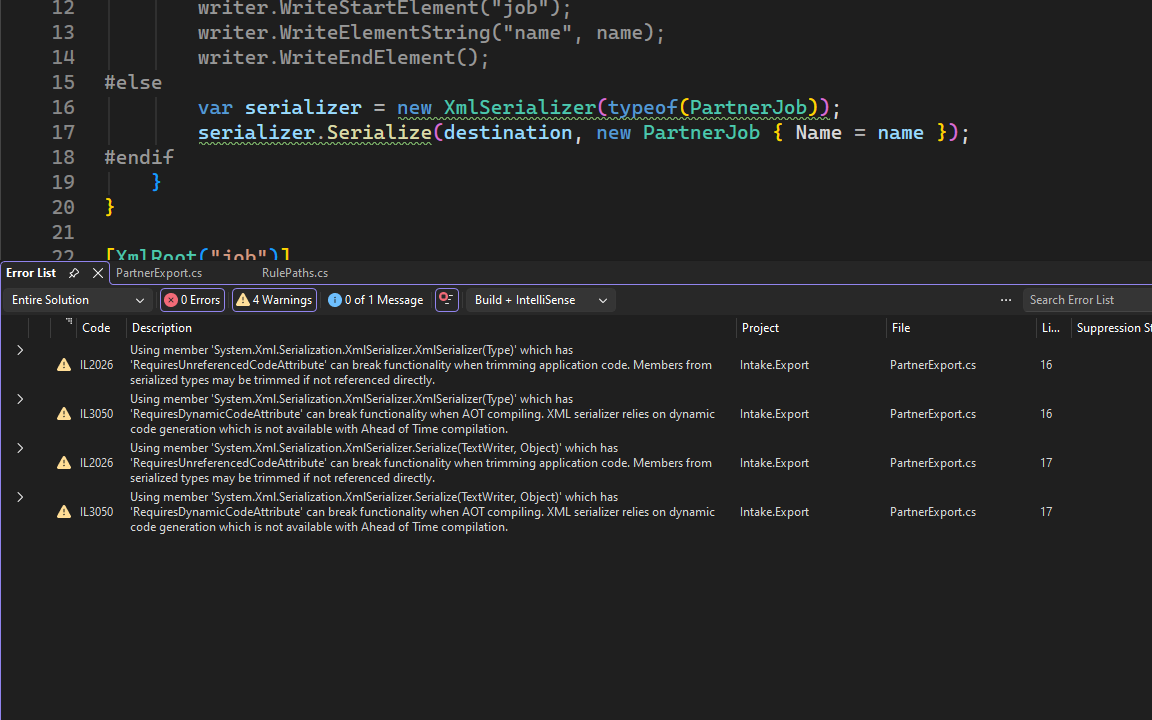
Serialize raised IL2026 and IL3050. The partner test then checked whether the XML still contained the name.Before spending time on a native build, ask what the user can add after you ship. A host whose customers drop in new managed plug-in DLLs needs dynamic assembly loading. Code that generates new methods with Reflection.Emit needs runtime code generation. Either requirement rules out Native AOT for that host. Some libraries offer an alternative. For example, an expression tree can use an interpreter under Native AOT. Check the cost of the actual expression and verify that every required operation still works. Native AOT limitations.
--self-contained true makes the application team ship and service the runtime. --self-contained false uses a compatible runtime on the receiver. A runtime identifier (RID) such as linux-x64 chooses the OS and processor family. On .NET 10 and 11, setting the RID alone still gives a framework-dependent publish, as does adding only application R2R. PublishSingleFile=true bundles files and normally implies self-contained in dotnet publish. Add --self-contained false for a framework-dependent single-file app. Both forms can keep the JIT. Trimming needs self-contained deployment. Native AOT requires both trimming and self-contained deployment. SDK publish defaults.
The RID also leaves room for differences within a fleet. On Windows and Linux x64, .NET 11 raises the minimum processor feature level to x86-64-v2 and targets x86-64-v3 by default for ReadyToRun images. A supported older processor can need the JIT when it cannot use an image built for a higher feature level. Qualify the actual executable, base image and CPU model on the machines the operator owns. .NET 11 hardware requirements.
Which setting would you ship for each Intake application?
Choose a constraint in the figure. The CLI row refers to Intake's fixed XML schema and qualified Linux target. Switch to the plug-in row. Would you still ship the same artifact if the next partner could install a new DLL?
A size limit and a plug-in requirement point to different builds
- In ten fresh .NET 11 API runs per build on the M3 Max, individual ReadyToRun reduced median JIT starts through the first request stop from 694 to 648. Time the client's first correct reply separately.
- Across six Windows worker pairs, upgrading .NET 10 to 11 with ordinary JIT reduced CPU per correct file by 14.1% at the paired median. Hold the runtime fixed before testing a PGO change.
- On .NET 11 Linux x64, the ordinary self-contained CLI occupied 80.25 MiB. Native AOT with an explicit XML writer occupied 17.93 MiB. Both folders include symbols. Parse the partner's name from each export.
- If customers install new managed assemblies after publish, keep an untrimmed JIT host. In Intake's serializer test a generated DLL shipped with both builds. Ordinary JIT recovered four names, Native AOT none.
In the download, see the Part 4 Mac first-response trace, the Windows worker's six migration pairs, the Part 11 Linux x64 CLI file manifests and the Part 6 Mac XML serializer generator runs. Native AOT's dynamic loading restrictions apply to managed plug-ins.
Start with dotnet publish -c Release. If it meets the budget, leave the executable’s .csproj alone. Check inherited settings in Directory.Build.props, publish profiles and the process environment before a trial.
When the API’s first correct response is late
Keep the JIT. If a startup trace puts compilation on the slow first request, insert this group inside <Project> in the API’s .csproj. RuntimeTrial is the trial name you define.
<PropertyGroup
  Condition="'$(RuntimeTrial)' == 'R2R'">
  <PublishReadyToRun>true</PublishReadyToRun>
</PropertyGroup>
On a Linux x64 builder, publish from the extracted solution root. For a native Apple Silicon trial use osx-arm64 in both commands. The sample’s TargetLine selects .NET 10 or 11 across its projects.
app=src/Intake.Api/Intake.Api.csproj
dotnet publish "$app" -c Release \
  -r linux-x64 --self-contained true \
  -p:TargetLine=net11.0 \
  -o out/api-ordinary
dotnet publish "$app" -c Release \
  -r linux-x64 --self-contained true \
  -p:TargetLine=net11.0 \
  -p:RuntimeTrial=R2R -o out/api-r2r
Omit any -p:PublishReadyToRun=false from the candidate command. It would override your project setting.
Keep R2R if it fixes the first-response deadline. Alternate fresh instances. Time from before launch until the client parses the first valid POST’s 202 response and verifies the job name and ID. If the agreed limit is a p95, compare p95 across launches. Require the candidate to meet that limit repeatedly, keep warm latency within budget, and return a typed 400 without changing the journal for an invalid job. Intake’s 694 versus 648 median JIT starts justify a trial. Until the latency gain is measured, keep the ordinary API. If the trial passes, set PublishReadyToRun to true in the production publish profile.
When worker CPU per delivered job is too high
Keep tiering and dynamic PGO. If a hot rule dominates CPU, start the same binary with defaults and with DOTNET_TieredPGO=0 in separate processes. To publish the second configuration, add <TieredPGO>false</TieredPGO> inside the worker’s <PropertyGroup>. Clear launch overrides and verify "System.Runtime.TieredPGO": false in its published *.runtimeconfig.json.
Test CPU per correct delivery. Alternate configurations on the same runtime, with the same job mix and arrival rate. Divide process CPU seconds used during each warm window by the number of correctly parsed partner files. Keep PGO off only if that cost falls beyond control-to-control variation, first-job latency and queue age stay within budget, and every expected export arrives. The 14.1% in the figure came from a runtime upgrade. The PGO listing alone leaves the worker on its defaults.
When a CLI exceeds its size or startup budget
Size. Add <PublishTrimmed>true</PublishTrimmed> inside the CLI’s <PropertyGroup>. Compare against the untrimmed self-contained publish on the same target with the same writer and symbol policy. Count the complete folder and check ordinary, empty and escaped partner inputs. If trimmed JIT fits and the fields survive, stop there. The 19.19 MiB trimmed .NET 11 JSON exporter on the Mac still delivered both expected fields.
Startup or a tighter size limit. For a known platform and schema, trial <PublishAot>true</PublishAot> in the executable project. It includes trimming. With a 25 MiB example allowance, the Linux XML tool’s 80.25 MiB ordinary folder fails and its 17.93 MiB native folder passes. To select AOT for speed, alternate fresh launches with the same writer and inputs. Keep it if time to parsed output and successful exit meets the deadline, and all required formats work. For new managed plug-ins, keep ordinary untrimmed JIT.
MVC console. Keep ordinary JIT for controllers and Razor views. If the first page misses its deadline, try R2R and check the rendered job name and failure reason. ASP.NET Core’s Native AOT feature matrix.
Keep the simpler deployment when both builds meet the budget. To roll back, redeploy the saved ordinary folder and remove the trial setting.
When would you leave every compiler switch alone?
Take a file-triggered alarm. The user waits from the moment a file becomes available until the importer returns the correct count. If the previous command is still running, a new file waits in a queue before its own process starts. A timer inside that process misses the part of the delay that grows under load.
On the shared Windows EPYC 7502P, the same .NET 11 importer processed four groups of 32 small files per policy, with a new file arriving every 8 ms within a group. One policy launched a command per file. The other launched one command with up to eight already-ready files whenever the previous command finished. Each alarm had to match its file and count. Read p99 as the second-slowest of the 128 file waits.
| File available to checked alarm | n | p50 | p95 | p99 | Max |
|---|---|---|---|---|---|
| One launch per file | 128 | 544 ms | 1,013 ms | 1,095 ms | 1,137 ms |
| Launch with ready files | 128 | 56 ms | 76 ms | 79 ms | 84 ms |
Measured from dispatch, the one-file policy's p99 was only 45 ms. The person waiting for the alarm saw over a second. Letting a launch take the files that were already waiting cut the number of processes from 128 to 31. It changed the customer's wait before anyone changed the compiler. For a short-lived tool launched repeatedly, process lifetime belongs in the decision alongside publish mode. File arrival, dispatch and the verified alarm.
- Write down the first useful result and how you will check it on the receiver.
- Keep an ordinary Release control. Record runtime version, target, cache conditions and who ships the runtime.
- Change one setting that can affect the measured cost. Use fresh processes for startup, representative repeated work for worker CPU, and the complete shipped folder for size.
- Run normal and failure paths against the published files. Keep the simpler deployment when both meet the budget.
Further reading
- .NET 10 CoreCLR configuration defaults
- .NET 11 CoreCLR configuration defaults
- Runtime configuration for compilation and PGO
- ReadyToRun method selection and interaction with tiering
- Trimming self-contained applications
- Single-file application deployment
- Native AOT deployment, toolchains and supported targets
How .NET Runs Your Code, part 12 of 12. Previous, JIT, ReadyToRun or Native AOT? Four .NET Release Decisions.